RELAY
AI customer support that knows when to act and when to step aside.
Relay is an AI-first support platform for subscription businesses. It resolves repetitive customer issues, learns from trusted product knowledge and hands complex cases to human agents with the full conversation context intact.
My role: Lead product designer on an independent concept. I owned product framing, UX, UI, the design system and the go-to-market story.
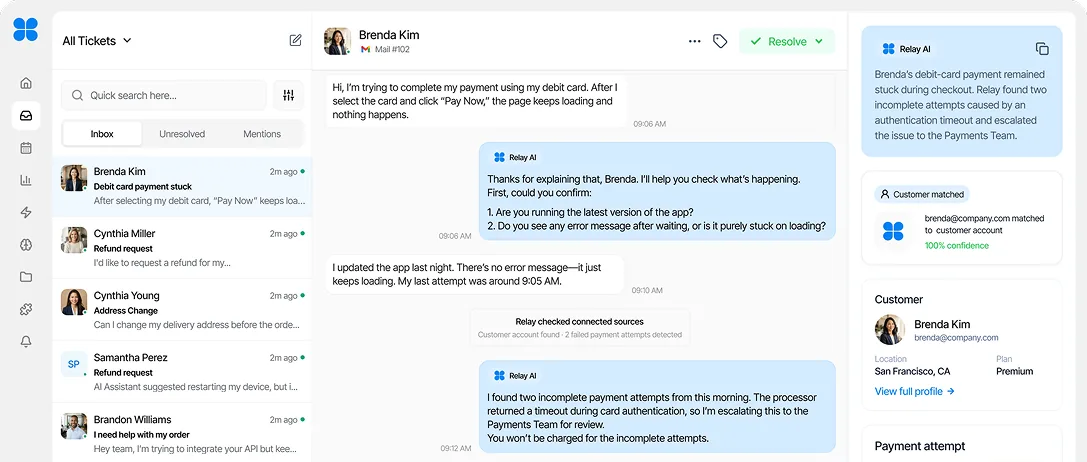
— OVERVIEW
Relay began with a simple question: how can support teams automate repetitive requests without making customers feel like they are talking to a machine?
I designed an AI-first support platform for subscription businesses, bringing conversations, product knowledge, customer details and escalations into one workspace. Relay handles routine questions on its own, but passes sensitive or complex issues to a human agent with the full context already attached.
- My role
- Lead Product Designer (independent concept)
- Industry
- B2B SaaS · AI Customer Support
- Scope
- Product framing · UX/UI · Design system · Go-to-market story
- Year
- 2026
THE PROBLEM
Customer support automation often solves one problem by creating another. It reduces repetitive work for support teams, but can leave customers stuck in rigid conversations when their issue falls outside the expected path.
For Relay, the challenge was to design an AI support system that could act independently without taking control away from people. It needed enough product knowledge and customer context to resolve routine requests, while recognising when an issue required human judgement.
THE DESIGN QUESTION
How might we automate the repetitive parts of customer support without making the experience feel automated?
Automation without dead ends
Customers needed a clear path to a person whenever Relay could not confidently resolve an issue.
Context spread across different tools
Messages, account details, payment events and product information needed to come together in one workspace.
Knowing when to hand over
Relay needed to distinguish between predictable requests it could handle and sensitive cases that required human judgement.
Trust without slowing teams down
Support agents needed to understand what Relay had done, why it had acted and what still required their attention.
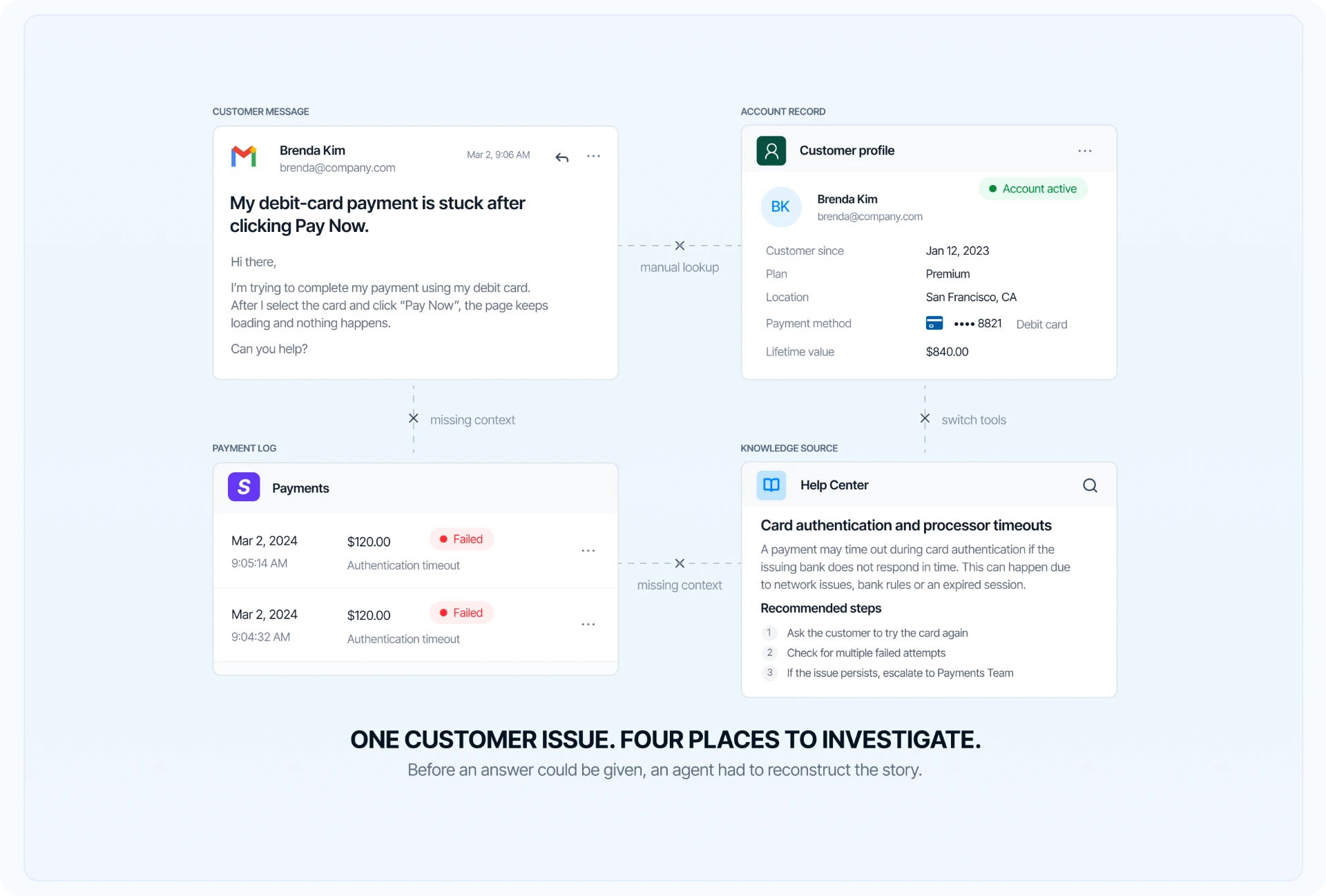
FRAMING THE PRODUCT
Before designing screens, I needed to define what Relay should handle—and where it should step back.
Because Relay is an independent product concept, the starting point was not a set of client findings. I framed the product around familiar support situations in subscription businesses: failed payments, account access, plan changes and refund requests.
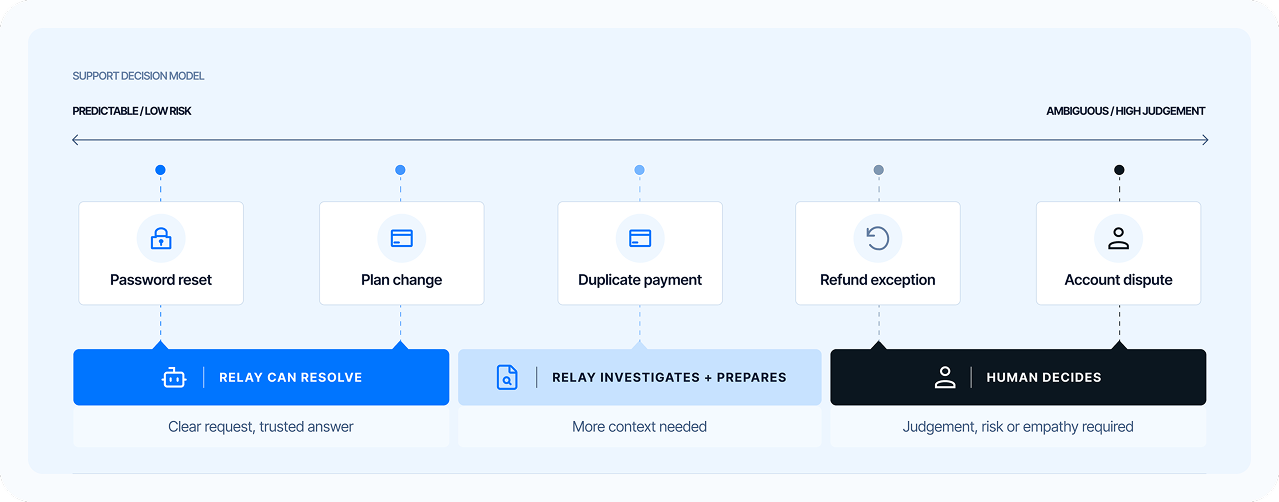
KEY DECISIONS
The decisions that made Relay trustworthy.
- I kept the conversation at the centre of the workspace and didn’t give AI its own separate area, so agents never lose context.
- I added confidence indicators and an explicit human handover so automation never dead-ends a customer.
- I limited Relay to approved knowledge sources so every answer can be traced and trusted.
- I built shared status patterns (synced, low confidence, escalated) so they read the same everywhere.
STRUCTURING THE WORKSPACE
The workspace had to keep the conversation at the centre.
I organised Relay around the work support teams already do: respond to customers, check trusted information, understand account history and step in when automation reaches its limit.
Rather than separating AI into its own world, each product area was designed to strengthen the same support conversation.
DESIGNING THE CORE EXPERIENCE
Everything an agent needs, organised around the conversation.
I brought customer context, trusted knowledge, payment activity, AI reasoning and human handover into a single workspace, so agents can resolve issues without switching between tools.
The information architecture puts the conversation at the centre, with the right context and actions at hand, helping agents move from question to resolution faster.
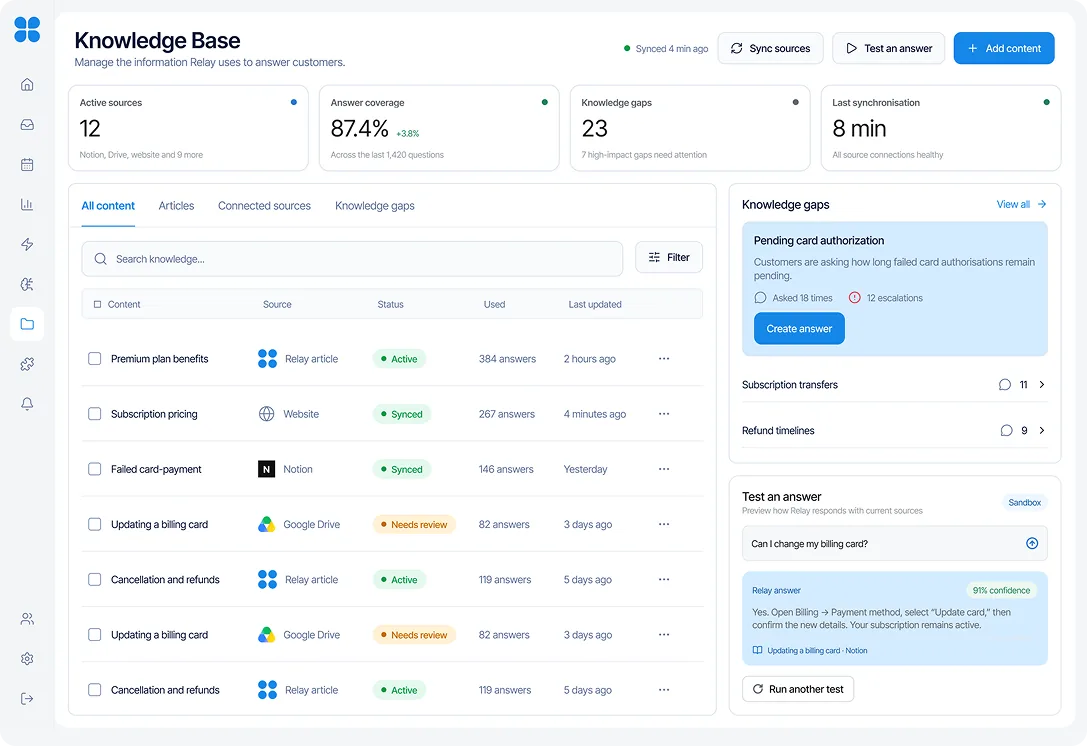
BUILDING TRUSTED KNOWLEDGE
Relay should only answer from information the team trusts.
Automation becomes risky when the source behind an answer is unclear or out of date. I designed the knowledge area as a controlled source of truth, where support teams can connect existing documentation, organise articles and decide what Relay is allowed to use.
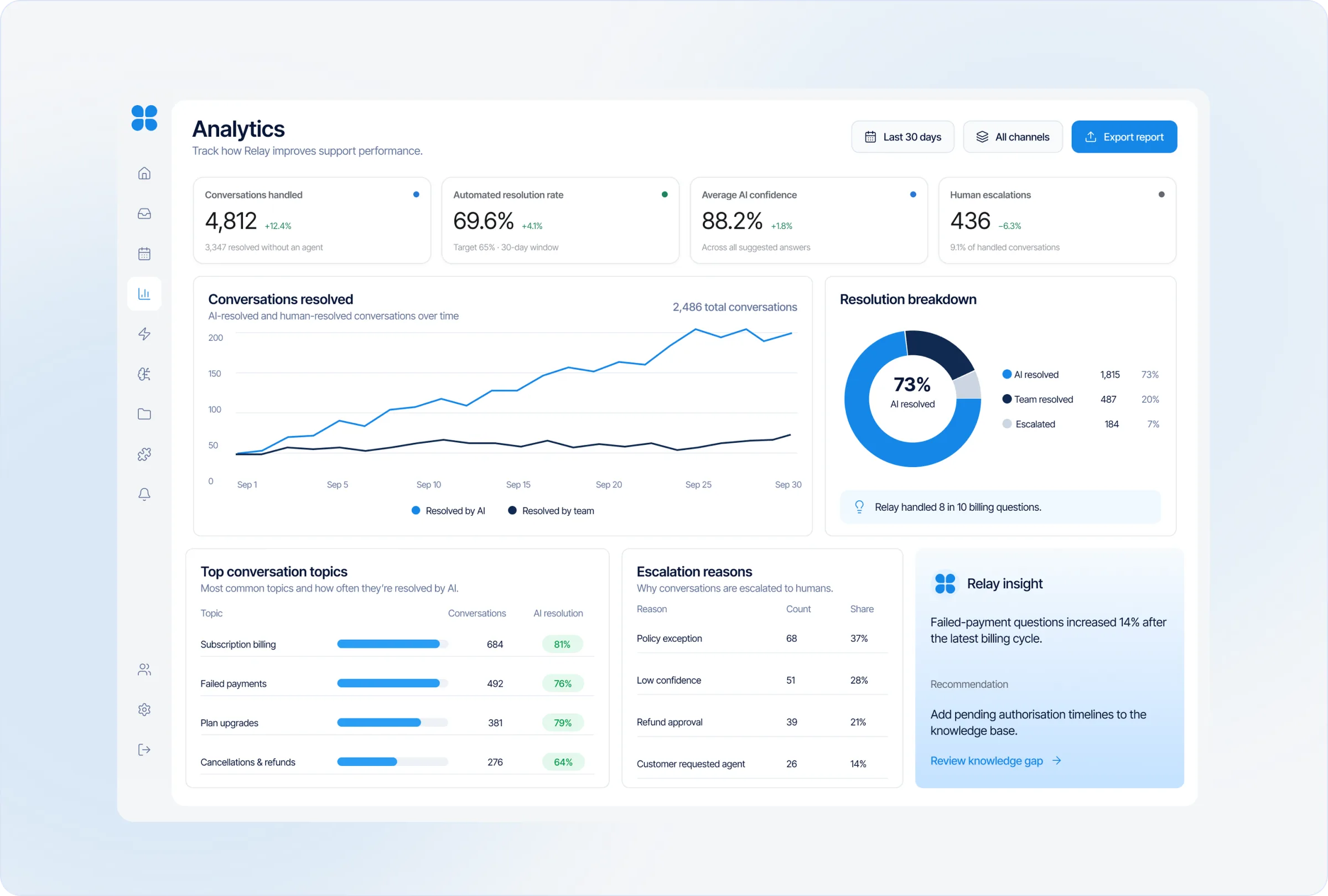
MEASURING SUPPORT PERFORMANCE
Teams needed to see not only how much Relay handled, but where it still needed help.
I designed the analytics workspace to make Relay’s performance easier to understand across every customer conversation. Instead of presenting activity as a collection of disconnected numbers, the screen brings resolutions, handovers and recurring support issues into one clear view.
CONNECTING THE PRODUCT STACK
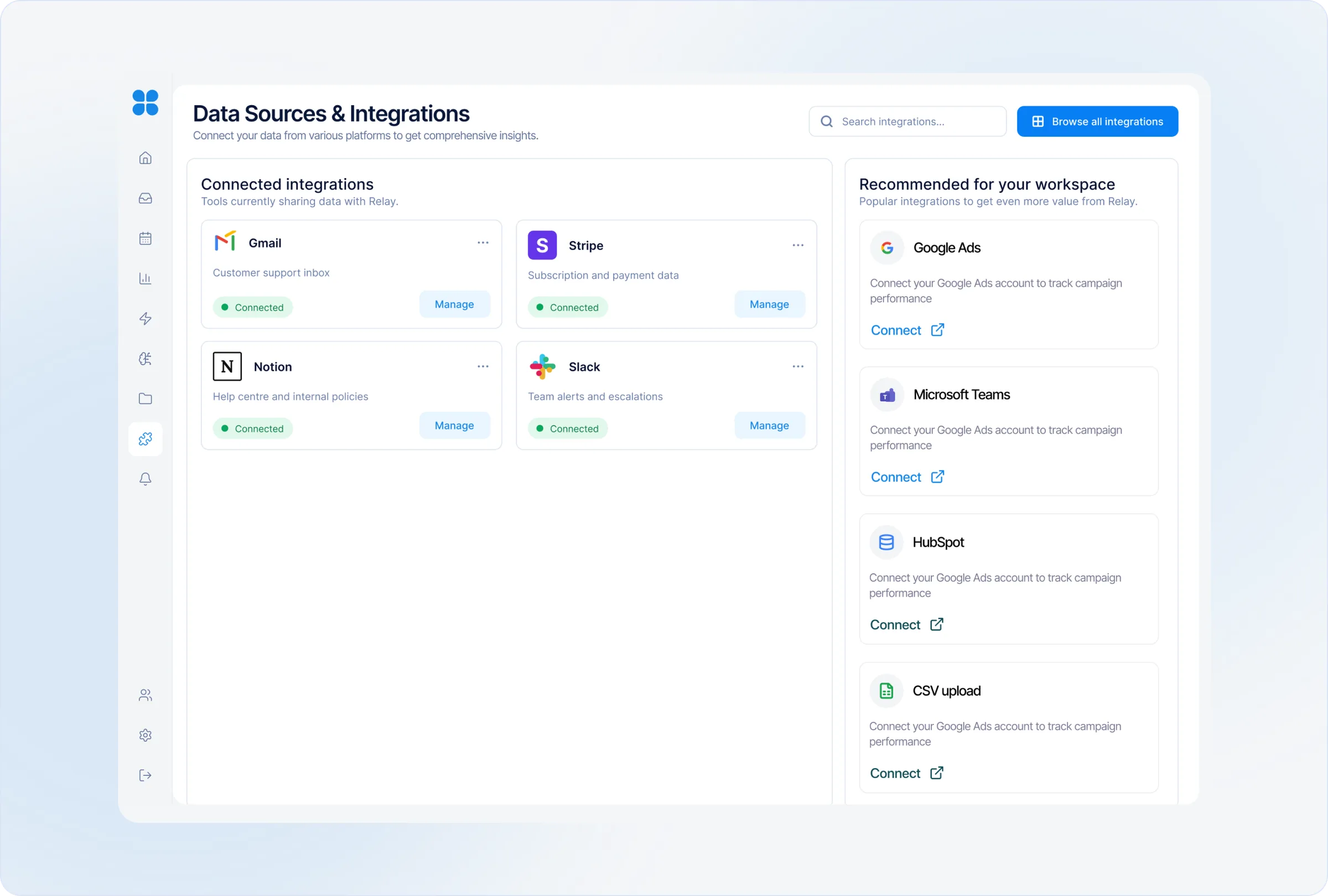
Relay works best when it understands the tools a business already relies on.
Customer information rarely lives in one place. Payment activity, product documentation, account details and team communication are often spread across several platforms.
I designed the integrations experience to bring those systems into Relay without making setup feel like a technical project. Each connection clearly explains what information Relay can access, its current status and when the data was last synchronised.
DESIGNING THE SYSTEM
Every part of Relay needed to speak the same visual language.
As the product expanded across conversations, knowledge, analytics and integrations, I created a reusable design system to keep the experience consistent. The system brought the product’s colours, typography, spacing, controls and interface patterns into one shared foundation.
Beyond visual consistency, I used repeated status styles and interaction patterns to make Relay easier to understand. A synced source, low-confidence answer or human escalation is communicated in the same way wherever it appears.
TAKING RELAY TO MARKET
The product needed a clear story before anyone could understand its value.
I translated Relay’s core capabilities into a simple, benefit-led story: connect the tools a team already uses, resolve routine conversations with trusted information and hand sensitive issues to people with the full context preserved.
OUTCOME / IMPACT
A complete product system, ready for testing.
Outcome: a complete product system covering conversations, knowledge, analytics and integrations, plus a reusable design system and a go-to-market narrative. The next step is usability testing of the handover flow with support teams.
REFLECTION
Trust in an AI product comes from knowing where its limits are.
Relay reinforced that designing for AI is not simply about making automation feel intelligent. It is about deciding what the system should handle, showing the information behind its decisions and creating a clear path to human support when confidence is low.
The project pushed me to think beyond individual screens and consider how conversations, customer context, trusted knowledge and business systems work together as one experience.
If I continued developing Relay, the next step would be testing the concept with support teams and customers—particularly the handover flow, confidence indicators and the amount of context agents need to act with confidence.